
Unlock Hidden Revenue Streams Through MCI Engagement Mastery
Microsoft partners invest heavily in skills, certifications, and delivery excellence, but many still leave money on the table. The reason is rarely a lack of capability; it’s often a lack of operational mastery of incentives. The Microsoft Commerce Incentive (MCI) program was designed precisely to reward partners for the real work they already do: delivering high-value engagements across solution areas like Azure, Security, Modern Work, and Business Applications through Microsoft Partner Center.
At the heart of this program lies the concept of MCI engagement, structured, eligible partner activities that, when executed and claimed correctly, translate directly into rebate earnings. What makes MCI powerful is not just the payout rates but the predictability it offers. Once you understand eligibility signals, customer enrollment, proof of execution (POE), and claim statuses, incentives shift from being “nice-to-have” bonuses into forecastable revenue streams.
One of the most overlooked signals is the small green eligibility icon displayed in Partner Center. That green indicator quietly answers a critical question: Can I earn for this engagement in my enrolled locations? Partners who routinely audit and act on these indicators can unlock revenue others miss entirely.
This blog is a practical, end-to-end guide to mastering MCI engagements. We’ll walk through where to find eligible engagements, how to interpret green icons and summaries, how to enroll customers and submit claims, and how to avoid common status pitfalls that delay or block payouts. By the end, you’ll see how disciplined MCI engagement management can transform incentives from reactive paperwork into a scalable growth engine—especially as Microsoft expands opportunities in FY26.
Table of Content
- MCI Engagements Basics
- Summary and Eligibility Deep Dive
- Customer Claims Mastery
- Claim Statuses and Optimization
- Actionable Strategies
- Summing it up
MCI Engagements Basics
Everything starts in Microsoft Partner Center. To explore eligible MCI opportunities, partners navigate to:
Sign in → Incentives → MCI Engagements
This section is your master catalog of engagements Microsoft currently offers under the MCI program. The list is dynamic and filtered, meaning you only see engagements relevant to your partner profile, roles, and enrolled locations.
Understanding the Engagement Listing
Each engagement row includes several key columns:
Engagement name
The specific incentive activity (for example, Azure migration, Security deployment, or accelerator-based engagements).Partner role
Indicates whether the engagement applies to CSPs, Advisors, or other partner roles.Eligibility indicator
A green icon signals that at least one of your enrolled locations is eligible to earn.Status
Shows whether the engagement is active, retired, or restricted.
Green Icon Breakdown
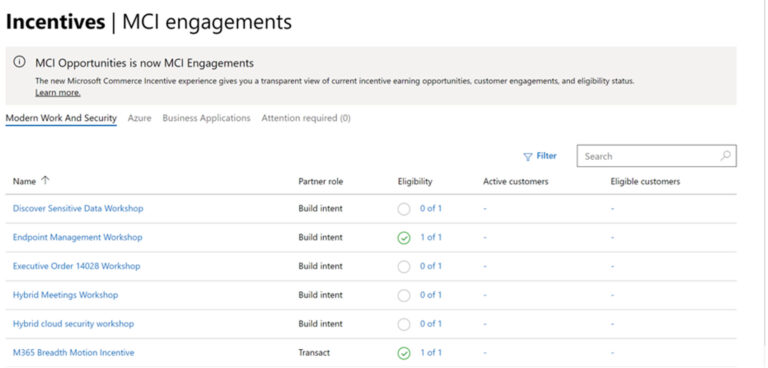
Green icon visible
You have earning potential. The icon reflects the ratio of enrolled locations that are eligible to earn versus total enrolled locations.No icon displayed
Zero earning locations. This is not a dead end; it’s a prompt to perform an eligibility audit.
If you believe an engagement should apply to you but doesn’t appear, the next step is escalation. Partners can work with their Partner Development Manager (PDM) to validate roles, locations, and solution designations and request inclusion where appropriate.
Filters = Opportunity Discovery Tools
The filters at the top of the MCI Engagements page are powerful when used intentionally:
Solution area
Focus on Azure, Security, or other domains aligned with your pipeline.Location
Identify which geographies can earn.Status
Surface only active engagements.Partner role
Ensure alignment with your contractual role.
Advanced partners don’t browse this list casually; they mine it weekly to uncover new or newly eligible MCI engagement opportunities that align with current customer demand.
Summary and Eligibility Deep Dive
Clicking any engagement opens two critical pages: Summary and Eligibility. Together, they determine whether an engagement is worth pursuing and whether you’re operationally ready to earn.
The Summary Page: Your Pre-Flight Checklist
The Summary page answers five essential questions before you enroll a customer:
- What does Microsoft pay for?
A clear description of the earning motion and expected outcomes. - Who qualifies?
Partner requirements (designations, roles) and customer eligibility criteria. - What proof is required?
Detailed Proof of Execution (POE) requirements documents, timelines, and validation artifacts. - What resources are available?
Links to guidance, playbooks, and delivery documentation. - How much can I earn?
Incentive rates or payout structures are tied to the engagement.
Smart partners review this page before committing resources. If POE requirements are unclear or too heavy for a small deal, it may be better to prioritize another MCI engagement with a cleaner path to payout.
The Eligibility Page: Where Revenue Gets Activated
The Eligibility page is operationally decisive. It lists:
- Enrolled locations
- Green checkmarks indicating earning eligibility
- Payee profile status, including linked tax and bank profiles
Even if an engagement looks perfect on paper, missing green checks here will block earnings.
Common Eligibility Fixes
- Incomplete tax profile
Update and validate tax documentation. - Missing bank details
Ensure a compliant payee account is linked. - Location not enabled
Confirm the location is properly enrolled for incentives.
Page | Key Features | Action Items |
Summary | Criteria, POE, rates | Review before customer enrollment |
Eligibility | Location status, payee profiles | Update tax/bank; fix non-green checks |
Partners who schedule monthly eligibility reviews dramatically reduce last-minute payout failures.
Customer Claims Mastery
Once eligibility is confirmed, revenue realization happens through Customer Claims. Access this area via:
Incentives → Customer claims
This workspace provides an all-in-one view of every customer associated with your MCI engagement activities.
Navigating Customer Claims
Customer claims are organized by solution area and can be:
- Filtered by status
- Sorted by date or customer
- Exported for offline analysis and dashboard
Exports are especially valuable for revenue forecasting and operational reviews.
Adding Customers Correctly
To start a claim:
- Select + Add customer
- Choose the engagement
- Add the customer via:
- Partner activities, or
- CPOR (Customer Partner of Record) association
Next comes customer consent, a non-negotiable step. Microsoft requires customer acknowledgment before it can pay incentives.
Consent Best Practices
- Request consent early, ideally at project kick-off.
- Batch enroll customers who are implementation-ready.
- Well-timed requests routinely achieve 70–80% consent acceptance rates.
Proof of Execution (POE): The Deciding Factor
POE is where most delays occur. High-performing partners treat POE as a structured deliverable, not an afterthought.
Effective POE includes:
- Clear timelines
- Evidence of activities completed
- Alignment to engagement criteria
- Documentation of challenges and resolutions
Submitting POE proactively reduces the likelihood of claims falling into “Partner action required.”
Claim Statuses and Optimization
MCI claims progress through more than 20 different statuses, each representing a specific stage in Microsoft’s validation and approval process. Understanding what these statuses mean and how to respond to them prevents unexpected delays, rejected claims, and missed payouts. Partners who actively monitor claim statuses can intervene early, correct issues quickly, and maintain a steady cash flow. Instead of treating status updates as passive notifications, high-performing partners use them as operational signals that guide next actions, improve approval rates, and shorten payout cycles.
Approved
An Approved status confirms that all eligibility requirements, customer consent, and proof of execution have been successfully validated. The engagement meets Microsoft’s criteria, and the incentive is cleared for payment according to the payout schedule. While no further action is required, partners should still record these approvals for forecasting and performance analysis.
Under Review
When a claim is under review, Microsoft is actively validating submitted details, including POE, timelines, and eligibility alignment. This stage requires patience but also preparedness. Partners should keep supporting documentation readily available in case additional clarification is requested, as delays often occur when follow-up responses are slow or incomplete.
Rejected
A Rejected status indicates the claim did not meet one or more criteria, commonly due to insufficient POE, missed timelines, or ineligible customer or partner conditions. Rejections should be analyzed carefully to identify root causes. These insights help refine future submissions and reduce repeated errors across similar MCI engagements.
Partner Action Required
This status means Microsoft needs additional information, corrections, or responses before proceeding. It is the most time-sensitive stage, as unresolved actions can stall or invalidate claims. Promptly addressing requests using clear, structured updates often results in the claim moving back into review rather than being rejected outright.
Disputed / Dispute Under Review
A Disputed status occurs when a partner formally challenges a rejection or decision. Success here depends on strong evidence, clear alignment with eligibility criteria, and well-documented POE. While disputes take time, they are an important optimization tool for recovering revenue when claims were initially misunderstood or incorrectly evaluated.
Optimization Strategies
Effective MCI optimization depends on proactive claim management rather than reactive fixes. Incentive claims are dynamic, and even small delays in response or oversight can slow approvals or result in lost revenue. Partners who embed daily monitoring, fast issue resolution, and data-driven analysis into their operating rhythm consistently outperform those who treat claims as periodic administrative tasks. The strategies below help reduce cycle times, improve approval rates, and turn MCI claims into a predictable, well-managed revenue stream.
Monitor claim statuses daily
Daily review of claim statuses allows partners to catch issues early, before they escalate into rejections or stalled payouts. By tracking movements between review stages, teams can anticipate next actions, prioritize urgent claims, and maintain visibility across all active MCI engagements. This habit significantly reduces last-minute surprises near payout cycles.
Resolve consent declines quickly
Customer consent is a common bottleneck in MCI claims. When consent is declined or delayed, immediate follow-up is essential. Clear communication on why consent is required and how it benefits the engagement often resolves concerns quickly, keeping the claim on track and preventing expiration or cancellation.
Respond to “Partner action required” within SLA windows
Claims marked as “Partner action required” are time-sensitive. Responding within SLA windows with complete, well-structured updates prevents automatic rejection. Fast, accurate responses also signal operational maturity and help claims move smoothly back into review or approval stages.
Use exports to identify recurring rejection patterns
Exported claim data provides valuable insight into why claims fail. Regular analysis highlights recurring issues such as missing POE elements or eligibility gaps. Addressing these patterns systematically improves future submissions, reduces rework, and increases overall incentive yield.
For FY26, Microsoft is expanding incentive stacking opportunities, especially for Security accelerators like Defender and Purview. Aligning your MCI engagement strategy with these motions can significantly lift per-customer earnings.
Actionable Strategies
A Practical MCI Engagement Mastery Roadmap
Mastering MCI is about building a repeatable operating rhythm that converts eligible activity into predictable revenue. Partners who succeed treat MCI engagements like a disciplined business process, not an afterthought. By auditing locations, managing customer pipelines, standardizing proof of execution, analyzing performance data, and scaling the right engagement types, incentives become measurable and forecastable. The roadmap below breaks MCI engagement mastery into five focused actions that any partner can operationalize immediately to improve approval rates, reduce delays, and maximize long-term return on effort.
Audit locations weekly
A weekly location audit ensures your enrolled geographies remain fully eligible to earn. Check that incentive enrollment is active, green eligibility indicators are intact, and no locations have slipped due to expired profiles. This habit prevents last-minute surprises where approved work cannot be paid because a location was overlooked or misconfigured.
Pipeline customers intentionally
Successful partners align customer enrollment with delivery readiness. Secure customer consent early, ideally at project kickoff, and batch enroll customers who are implementation-ready. This approach improves consent acceptance rates, reduces stalled claims, and creates a predictable flow of submissions instead of rushed, end-of-quarter incentive activity.
Standardize POE templates
Proof of Execution should never be recreated from scratch. Standardized POE templates aligned to engagement criteria reduce rework, eliminate ambiguity, and speed reviews. Clear timelines, structured evidence, and consistent formatting help reviewers validate claims faster, minimizing “Partner action required” delays and accelerating approvals.
Analyze exports quarterly
Quarterly analysis of exported claims data reveals which engagements deliver the highest return. Track approval rates, payout timelines, and revenue per engagement type. Use these insights to double down on high-ROI motions and discontinue low-performing or overly complex engagements that consume effort without proportional rewards.
Scale high-payout engagements
Once patterns emerge, scale what works best. Focus on high-payout motions such as CSP accelerators and security-led engagements, where incentives align closely with customer demand. Build repeatable delivery and claim processes around these engagements to grow incentive revenue without increasing operational complexity.
Consistency, not complexity, is what turns MCI into predictable revenue. Partners who apply these practices systematically move from reactive claiming to proactive incentive management. By repeating these five actions every quarter, MCI engagement earnings become easier to forecast, simpler to manage, and tightly aligned with business growth rather than administrative effort.
Summing it up
An MCI engagement is more than an incentive; it’s a revenue multiplier when managed with discipline. By mastering Partner Center navigation, eligibility checks, customer claims, and status optimization, partners can convert everyday delivery work into dependable earnings. The partners who win in FY26 won’t be the ones doing more work; they’ll be the ones capturing the value of the work they already do. Start with an eligibility check today, and unlock the hidden revenue streams waiting in MCI.